Table of Contents
Views for WPForms supports adding Custom HTML field to Multiple Entries or Single Entry View.
Apart from text/html you can also use WPForms Smart tags inside it.
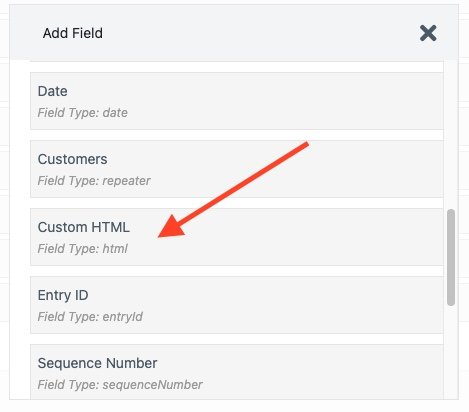
To add Custom HTML field click on Add Field link & Select Custom HTML from fields list.

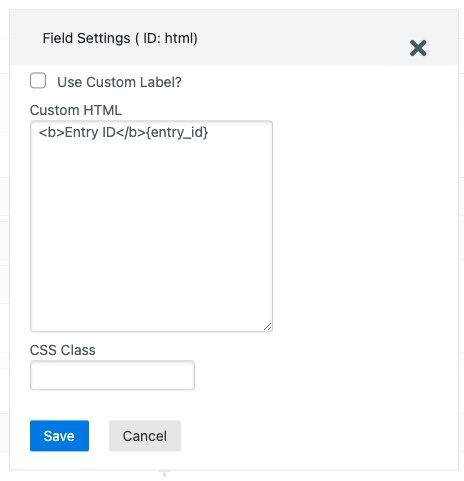
Now click on the field to open field settings in the sidebar.

Add text/html or smart tag inside the Custom HTML box.

Below is a list of WPForms Smart Tags you can use inside Custom HTML field:
- Basic Smart Tags
{admin_email}{field_id="#"}{field_html_id="#"}{field_value_id="#"}{all_fields}{entry_id}{form_id}{form_name}{page_title}{page_url}{page_id}{date format="m/d/Y"}{url_referer}
- Unlock Hidden User Data
{user_ip}{entry_geolocation}{user_id}{query_var key=""}
- Author Details
{author_id}{author_display}{author_email}
- User Management
{user_display}{user_full_name}{user_first_name}{user_last_name}{user_email}{user_meta}{url_login}{url_logout}{url_register}{url_lost_password}
WPForms Views Smart Tags #
{entry_date} – The date when the entry was submitted.{entry_update_date} – The date when the entry was last updated.{entry_status} – The current status of the entry (e.g., published, draft, trashed).{entry_author} – The name of the user who submitted the entry.{entry_log} – Shows a list of entry logs with user and timestamp details.{entry_resume_link} – Link to resume editing a partially submitted entry (if resume is enabled).{edit_entry_url} – The direct URL to the entry edit page.{edit_entry_link} – A clickable “Edit” link that points to the entry edit page.{single_entry_url} – The direct URL to view a single entry.{single_entry_link} – A clickable “View” link that takes you to the single entry page.{delete_entry_link} – A clickable “Delete” link to allow entry deletion.{entries_count} – Total Entries in view.
How to Use Smart Tags in Custom HTML Field to Display Data from Multiple Fields #
Assume your form has the following fields:
- Name (Field ID = 2)
- Email (Field ID = 3)
You want to show these fields data combined in a simple layout on your site using WPForms Views.
- Go to Views > Edit View for your form.
- Add a Custom HTML Field to the layout.
- Inside the Custom HTML field, add the following code:
<div>
<strong>Your Name is:</strong> {field_value_id="2"}
</div>
<div>
<strong>Your Email is :</strong> {field_value_id="3"}
</div>
Now when you check your View you will see data from both the fields in same column.

You can read more about Smart Tags on WPForms Site.